
Academia Campus Wallet
Connect international students from onboarding to campus life in one wallet.
One wallet for student ID, digital credentials, and campus life.
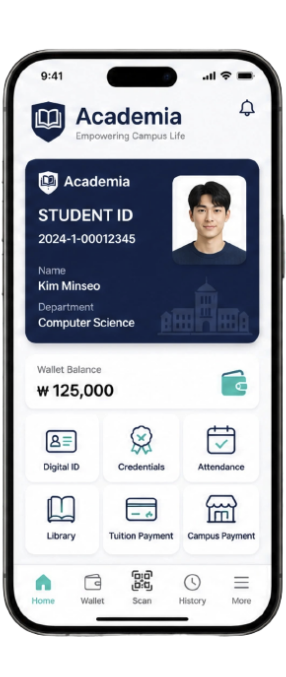
Academia is a campus wallet that helps universities support international students and lets students use mobile ID, digital credentials, library access, attendance, and tuition status in one app experience.
- Digital Student ID
- Digital Credentials
- International Students
Start small with mobile student ID and digital credentials without replacing existing university systems.
University teams
For universities evaluating international student support, mobile student ID, digital credentials, and a campus-use PoC.
International students
See how student ID, credentials, library access, attendance, and tuition status can live in one wallet.
Partners
Explore phased integrations with access control, libraries, payments, academic systems, and financial partners.
University competitiveness starts with student experience
As international student populations grow, universities need a new digital touchpoint for identity, credentials, tuition status, and campus use.
Universities competing for global students need a smoother student experience. After admission, student ID issuance, enrollment credentials, tuition confirmation, library access, attendance, and campus facilities are often split across systems and administrative offices.
Source: Study in Korea, 2025
Academia connects these touchpoints into one campus wallet experience.
Students experience one campus, but systems are split across many windows
International students and university teams lose time to repeated checks and disconnected systems.
Student ID issuance
Physical student ID issuance, reissue, and loss handling create friction.
Digital credentials
Issuing and submitting enrollment, graduation, and affiliation certificates is repetitive.
Tuition status
International transfers, exchange, payment confirmation, and fees create follow-up work for students and universities.
Library and access
Library, facilities, event venues, dormitories, and other campus touchpoints are separated.
Attendance and event verification
Class attendance, event check-ins, and program participation are handled through separate processes.
Repeated inquiries
Students and staff repeatedly handle questions about IDs, credentials, tuition status, and facility access.
Six campus experiences
one app connected
Academia connects student ID, credentials, library access, attendance, and tuition status into one wallet experience.
Academia is a campus wallet for universities
Connect mobile student ID, digital credentials, library access, attendance, and tuition status in one app experience.
Academia does not replace existing university systems. It connects to the necessary scope of academic, library, attendance, and finance systems already in operation, then creates mobile touchpoints students can feel.
Mobile touchpoint, verification, integration hub
Do not start with a full buildout. Start small and safely with features students actually use.
Connect the right touchpoints without replacing existing systems
Academia adds a student-friendly wallet experience on top of existing university systems.
Student Wallet Experience
- Mobile student ID
- Digital credentials
- QR verification
- Library
- Attendance
- Tuition status
Academia Trust Layer
- DID
- Digital Credential
- Verification
- Access Policy
- Privacy-first Design
University Systems
- Academic system
- Library system
- Attendance system
- Finance system
- Campus facilities system
Optional Partner Modules
- Bank
- Payment partner
- Access control system
- Campus merchants
- Government program platform
Connect the needed features step by step
Academia does not build everything at once. It starts with the student touchpoints each university actually needs.
Digital Student ID
Students can confirm their university status in the mobile wallet, and universities can verify that status where needed.
- Student profile
- Student number, affiliation, status
- QR-based check
- Library or event verification support
- Reduced loss and reissue burden
Digital Credentials
Enrollment, graduation, affiliation, and program participation credentials can be issued and checked digitally.
- Enrollment credential
- Graduation credential
- Affiliation credential
- Program participation credential
- Verification link for external submission
QR Verification
A student ID or credential presented by a student can be checked by QR.
- QR code display
- Staff or verifier scan
- Valid or expired status
- Verification log record
- Minimal sensitive data exposure
Expansion options (v2 / v3)
Library & Facilities
Library entry, book loans, event venues, dormitories, and other campus facilities can be connected in phases.
- Library entry
- Book loans
- Event check-in
- Facility access check
- Dormitory integration available
Attendance
Classroom, event, and program participation checks can be connected through mobile authentication.
- QR attendance
- Class attendance
- Event check-in
- Program participation records
- Attendance log checks
Tuition Status
International students can check tuition status, while universities manage confirmation workflows more efficiently.
- Payment status check
- Receipt check
- Outstanding balance notice
- Administrative receipt confirmation
- Improved payment-status clarity for international students
Tuition payment features are applied gradually after university legal, accounting, settlement-policy, and payment-partner review.
Campus Payment Option
Campus dining, cafes, facilities, and event payments can extend wallet usage into daily student touchpoints.
- QR payment
- Cafeteria payment
- Campus points
- Merchant settlement review
- Payment partner integration available
Campus payment is applied as an optional module aligned with university and partner policy, settlement, and accounting standards.
Make the campus start easier for international students
Connect the first things students need after admission - student ID, identity checks, credentials, and tuition status - in a mobile wallet.
- 1
Arrive
Admission and registration
Students start the Academia wallet through a school account or university verification process.
- 2
Verify
Mobile student ID issuance
The university issues a mobile student ID based on verified student information.
- 3
Prove
Digital credential storage
Students can view needed credentials such as enrollment, affiliation, program participation, and graduation in the wallet.
- 4
Use Campus
Campus use
Expand into needed touchpoints such as library, attendance, facilities, and event verification.
- 5
Go Global
External submission and global use
Expand so credentials can be checked for jobs, internships, exchange programs, and external institutions.
Your student ID, credentials, and campus life — all in one wallet.
Academia improves student convenience and university operations together
A service students actually use can improve administrative efficiency, global competitiveness, and the smart campus brand.
Better student experience
Provide student ID, credentials, library access, attendance, and tuition status in one wallet.
Reduced administrative load
Digitize issuance, checks, inquiries, and reissues to reduce repeated work.
International student support
Improve tuition-status visibility, enrollment credentials, and campus access to help international students settle in.
Smart campus brand
Extend into university digital transformation, global campus, and industry cooperation cases.
Start from practical convenience for international students and expand into campus-wide digital trust infrastructure.
Each department can use it in the way it needs
Blockchain stays invisible as trust technology
Students get an easy wallet experience; universities get a verifiable digital credential structure.
University issues
The university issues needed credentials such as student ID, enrollment, and affiliation.
Student holds
Students view and hold their student ID and credentials in the mobile wallet.
Verifier checks
Credential authenticity can be checked where needed: library, attendance, administration, or external submission.
Academia uses DID and Verifiable Credential concepts to manage student status and credential information in a verifiable digital form. The important part is not the terminology; it is a structure universities can trust and students can use easily.
Data minimization
Use only the minimum data needed to provide the service.
Avoid storing sensitive data on-chain
The default structure avoids directly storing sensitive student personal data.
University-policy-based issuance
The authority to issue student IDs and credentials follows university policy.
Verify only required credentials
Students selectively present only the credentials needed for each context.
Verification log management
Credential verification history is managed transparently and can be traced.
Consent-based expansion
Credential sharing and feature expansion are based on student consent.
The point is not blockchain messaging; it is a trusted digital credential structure universities can rely on.
Designed for university confidence
Answers common questions from procurement and information security teams.
- Q. Where is sensitive personal data stored?
- Academia does not directly store sensitive personal data in decentralized storage. The issuing university keeps it according to policy.
- Q. Do existing academic or finance systems need to be replaced?
- No. Integration starts with the necessary APIs or pilot scope.
- Q. How far can the pilot scope expand?
- It expands in phases based on university policy. The 12-week PoC is the starting scope.
- Q. Who controls governance?
- The authority to issue student IDs and credentials follows university policy.
- Q. Can anyone view audit logs?
- Permissions are separated so only required verifiers can view logs.
- Q. How is student consent handled?
- Feature expansion proceeds based on student consent.
Academia is not a project to replace university systems. It creates trust touchpoints students can feel.
Start with the screens students actually use
Academia is not a concept deck. It is built around a campus wallet experience students can use every day.
The first step is a 12-week pilot, not a full rollout
A university can judge rollout feasibility by validating student ID, digital credentials, and one real campus use case.
- Start small.
- Use it with real students.
- Collect feedback from university operating teams.
- Validate usability before adding features.
- Payment features do not need to be in the first PoC scope.
Start Small
- Mobile student ID
- Enrollment or affiliation credential
- Pilot cohort selection
- Basic screen setup
- QR verification structure design
Use in Campus
- Connect one use case among library, attendance, or event verification
- Small-scale user testing
- Collect student feedback
- Test with staff verifiers
Review & Expand
- Review usage
- Review student satisfaction
- Quantify administrative efficiency
- Decide the next stage
Start an Academia rollout
Universities, students, and partners are welcome. Contact us for a 12-week PoC or partnership discussion.
Email: contact@anam145.com
We reply within 1-2 business days.
For 12-week PoC inquiries, include your organization, role, and expected rollout timing so we can respond faster.
Email us